Batting
Rhino & Grasshopper plugin · v1.2.0 · updated
New
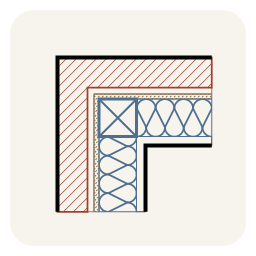
Batting (insulation) symbol for Rhino 8, like AutoCAD's BATTING linetype. Draw it along a polyline or turn any curve into it; it follows its base curve, curved walls included, centred or to one side. Fill the layer between two curves where the thickness varies. Edit the base with grips, set the width, shape, spacing, corners (fanned, butt or mitred) and faces in the Properties panel, and cut it away inside closed exclusion curves. Exports to DWG as lines and arcs. Includes Grasshopper components.
Install in Rhino
Install from the computer that runs Rhino · How to install
Download .yakWebsite (opens in a new tab)- Total downloads
- 6~0.9/day
- This week
- +21+21 this month
- Releases
- 3every ~1.0d · 100% of downloads on v1.2.0
- First released
- 10/22/2026
- Works with
- Rhino 8 · Windows
- Download size
- 79 KB
- License
- Not declared
- Credits
- pbrgle1


How to install Batting
- Click Install in Rhino to open Rhino's Package Manager with Batting selected, or run
_PackageManagerinside Rhino and search for Batting.On the computer running Rhino, run_PackageManagerand search for Batting. - Or install it from a terminal (assumes a default Rhino 8 installation):Windows (PowerShell)
& "C:\Program Files\Rhino 8\System\Yak.exe" install Batting - Or download a .yak file and drag it onto an open Rhino window.
- Batting-1.2.0-rh8_0-win.yakWindows · Rhino 8.0
Restart Rhino once the install finishes.
More by Primož Brglez

Related packages
- WallAssembly2DRhino plugin · 9 downloads
- autosectionRhino plugin · 275 downloads
- Y3D-ToolbarsRhino plugin · 11 downloads
- ShapeDiverRhino & Grasshopper plugin · 136.6K downloads
- Land_KitRhino package · 18.1K downloads
- rhino-mcpRhino plugin · 2.3K downloads
- d2p-componentsGrasshopper plugin · 1.5K downloads
- FEMurGrasshopper plugin · 1.3K downloads