
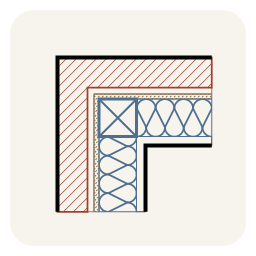
WallAssembly2D
Rhino plugin · v1.0.0 · updated
Drafts 2D wall assemblies in plan and in section in Rhino 8, like Offset. Select lines, polylines, arcs or curves, pick a side, and every layer of the chosen wall type is drawn as a closed, hatched region on its own sublayer, with mitered corners, wood or steel stud symbols at 16" o.c., batt insulation, and grouped output. In section (vertical construction plane) walls get plates or tracks at the ends and the stud beyond. Face, Centerline or StudFace alignment; Flip for asymmetric walls. Wall types live in an editable JSON schedule with a built-in editor (WallAssemblyEditTypes); 15 example wood and steel assemblies are included. Commands: WallAssembly, WallAssemblyEditTypes. MIT licensed.
- Total downloads
- 9~1.0/day
- This week
- +16+18 this month
- Releases
- 1
- First released
- 10/20/2026
- Works with
- Rhino 8 · Windows
- Download size
- 89 KB
- License
- Not declared
- Credits
- MonicaDonayre


How to install WallAssembly2D
- Click Install in Rhino to open Rhino's Package Manager with WallAssembly2D selected, or run
_PackageManagerinside Rhino and search for WallAssembly2D.On the computer running Rhino, run_PackageManagerand search for WallAssembly2D. - Or install it from a terminal (assumes a default Rhino 8 installation):Windows (PowerShell)
& "C:\Program Files\Rhino 8\System\Yak.exe" install WallAssembly2D - Or download a .yak file and drag it onto an open Rhino window.
- WallAssembly2D-1.0.0-rh8_0-win.yakWindows · Rhino 8.0
Restart Rhino once the install finishes.
Related packages
- Land_KitRhino package · 18.1K downloads
- BattingRhino & Grasshopper plugin · 6 downloads
- autosectionRhino plugin · 275 downloads
- KeystoneRhino plugin · 195 downloads
- HiddenLinesRhino plugin · 128 downloads
- vectorize-refinedRhino plugin · 33 downloads
- SuperstructureGrasshopper plugin · 21 downloads
- structural-engineeringRhino plugin · 0 downloads






Download trend
WallAssembly2D version history
| Date | Version | Builds | Downloads | Install |
|---|---|---|---|---|
| 10/20/2026 | 1.0.0 | 9 | Install |