
FacadeUnitPlacer
Rhino plugin · v1.0.38 · updated
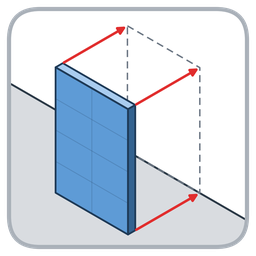
입면(면)을 선택하고 화면에서 파사드 유닛 객체를 선택하면 파사드를 자동 배치하는 Rhino 8 도구입니다. 명령 'FacadeUnitPlacer' 실행 → 입면(서피스/면) 선택 → 화면에서 유닛 객체 선택(XZ 평면 가이드 표시) → 좌우 정렬·배치 기준·배치 방식 설정 → '배치'. 평면 그리드 패널은 블록 인스턴스로, 곡면·테두리 패널은 파사드별 그룹으로 모델에 베이크됩니다. 한국어/English UI. 단일 .rhp 로 동작하며 외부 플러그인이 필요 없습니다. Select elevation faces and pick a facade unit object on screen to automatically place facades in Rhino 8. Run 'FacadeUnitPlacer', pick the elevation faces, pick the unit object (an XZ-plane guide is shown), set alignment / placement base / pattern, then place. Flat grid panels are baked as block instances, curved and edge panels as per-facade groups. Korean / English UI. A single, self-contained .rhp, no extra plug-ins required.
- Total downloads
- 113
- Recent downloads
- +34 / week+108 in the last month
- Latest version
- v1.0.389/29/2026
- Releases
- 5every ~23d
- First released
- 6/30/2026
- Download size
- 521 KB
- License
- Not declared
- Authors
- CHOI SEYEONG
Compatibility
How to install FacadeUnitPlacer
- Click Install in Rhino to open Rhino's Package Manager with FacadeUnitPlacer selected, or run
_PackageManagerinside Rhino and search for FacadeUnitPlacer. - Or install it from a terminal (assumes a default Rhino 8 installation):Windows (PowerShell)
& "C:\Program Files\Rhino 8\System\Yak.exe" install FacadeUnitPlacer - Or download the .yak file above and drag it onto an open Rhino window.
Restart Rhino once the install finishes.
Download trend
FacadeUnitPlacer version history
| Date | Version | Builds | Downloads |
|---|---|---|---|
| 9/29/2026 | 1.0.38 | 27 | |
| 9/29/2026 | 1.0.36 | 2 | |
| 9/28/2026 | 1.0.35 | 21 | |
| 9/15/2026 | 1.0.22 | 46 | |
| 6/30/2026 | 1.0.5 | 17 |
Related packages
- Eu_FacadeToolsGrasshopper plugin · 15 downloads
- Land_KitRhino package · 17,781 downloads
- PHOEBEGrasshopper plugin · 207 downloads
- ElytraGrasshopper plugin · 66 downloads
- howtorhino-toolsRhino plugin · 17 downloads
- ospreyRhino plugin · 13 downloads
- aalterRhino plugin · 9 downloads
- facetRhino & Grasshopper plugin · 3 downloads


Package data comes from Rhino's Yak package manager and is refreshed every few hours. Browse all packages A–Z or all authors.